

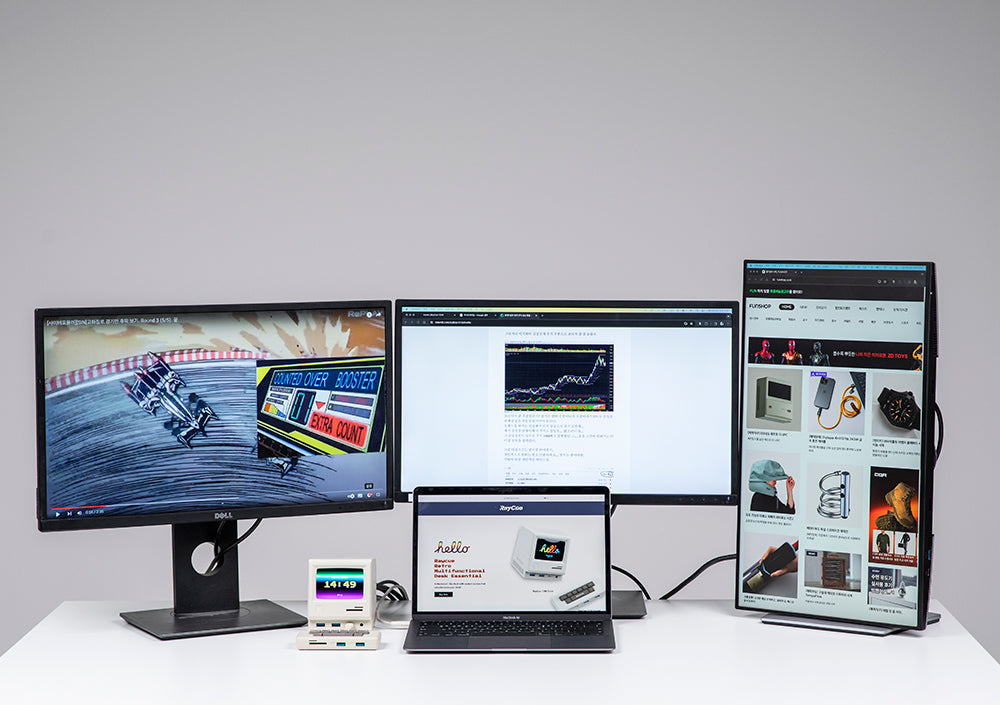
In 2026, the "Single Monitor" setup is officially a relic of the past. Whether you are a software developer multitasking between IDEs, a day trader tracking four charts at once, or a creative pro managing complex timelines, screen real estate is your most valuable asset.
However, many modern laptops—especially the base Apple M1, M2, and M3 chips—natively support only one external display. This is where the RayCue Unify15 (15-in-1 Dual/Triple/Quad Display Docking Station) enters the ring.
But does it live up to the hype? Let’s dive into the details.
1. The Power of Quad Display: Breaking Hardware Limits
The standout feature of the RayCue Unify15 is its ability to drive up to four external monitors simultaneously.
-
How it works: It utilizes a combination of DisplayLink Technology and DP Alt Mode.
-
The Setup: It features 3x HDMI ports and 1x DisplayPort.
-
For Mac Users: This is a game-changer. It bypasses the native display limitations of the MacBook Air and base MacBook Pro, allowing for a true multi-monitor workstation without lag.
2. 15-in-1 Connectivity: The Ultimate Desk Command Center
The "Unify15" name isn't just marketing—it literally unifies your entire peripheral ecosystem into one cable.
| Port Type | Specification | Use Case |
| Video Output | 3x HDMI, 1x DisplayPort (Up to 4K@60Hz) | Quad monitor setups |
| Data Transfer | 3x USB 3.2 (10Gbps), 2x USB 2.0 | High-speed SSDs & Peripherals |
| Power Delivery | 100W PD Charging | Fast-charging your laptop |
| Networking | RJ45 Gigabit Ethernet | Stable, lag-free internet |
| Audio/SD | 3.5mm Jack + SD/TF 4.0 Slots | Photography & Video editing |
3. Design & Thermal Management
High-performance docks often suffer from overheating. The Unify15 features a vertical aluminum alloy chassis. This isn't just for aesthetics; the vertical design acts as a natural heat sink and significantly reduces the footprint on your desk, keeping your workspace clean and professional.
4. Pros and Cons: The Honest Truth
The Pros:
-
Unmatched Display Support: One of the few reliable docks in 2026 that handles four 4K monitors.
-
DisplayLink Certified: Guaranteed compatibility with Windows, macOS (M1/M2/M3), and ChromeOS.
-
Charging Power: 100W pass-through means you can leave your laptop brick in your bag.
The Cons:
-
Driver Dependent: You must install the DisplayLink driver for full functionality.
-
Price Point: It is an investment, though significantly cheaper than enterprise-grade Dell or Belkin equivalents.
5. Final Verdict: Should You Buy the RayCue Unify15?
Buy it if: You are a power user who feels restricted by a single or dual monitor setup. If you own a MacBook Air and need more than one extra screen, this is arguably the best value-for-money solution on the market right now.
Skip it if: You only ever use one external monitor and don't need high-speed data ports. A simpler 5-in-1 hub would suffice.

Leave a comment
All comments are moderated before being published.
This site is protected by hCaptcha and the hCaptcha Privacy Policy and Terms of Service apply.